



Table of Content
6 Best Backpacks for College in 2026: Campus-Ready Picks

The best backpacks for college must carry more than a laptop. A typical class day may also involve notebooks, a textbook, chargers, headphones, lunch, a water bottle, and an extra layer—all while you walk across campus or commute by bus.
The North Face Recon is the strongest all-around option for most students because it balances capacity, computer storage, and load support. The LEVEL8 Atlas works better for students carrying substantial tech, while the JanSport Big Student offers more room at a lower price. Your ideal choice ultimately depends on laptop size, daily load, and walking distance rather than the highest advertised capacity.
Best Backpacks for College in 2026
The six recommendations below cover distinctly different campus routines. Start with the comparison table, then consider how each bag’s specifications would affect an ordinary day of classes.
|
Product |
Best For |
Capacity |
Laptop Compatibility |
Empty Weight |
Organization |
Main Limitation |
|
The North Face Recon |
Best overall |
30 L |
Up to 16 inches |
2 lb 9 oz |
Dedicated laptop and front compartments |
Internal pockets reduce some main-compartment space |
|
LEVEL8 Atlas |
Tech-heavy students |
31 L |
13–16 inches |
3.33 lb |
26 organizer pockets |
Heavy for a daily backpack |
|
JanSport Big Student |
Capacity on a budget |
34 L |
Up to 15 inches |
1 lb 7 oz |
Two main compartments |
Easy to overload |
|
Osprey Nebula 32 |
Long campus commutes |
32 L |
Separate laptop compartment |
About 2 lb |
Multiple compartments and compression straps |
Outdoor-inspired design may feel complex |
|
Fjällräven Räven 28 |
Campus-to-city use |
28 L |
Up to 15 inches |
2.2 lb |
Multiple internal and external pockets |
Not intended for larger 16-inch laptops |
|
Patagonia Refugio 26L |
Lightweight, simple carry |
26 L |
Removable laptop sleeve |
About 1.6 lb |
Minimal organization |
Small items may require separate pouches |
Product specifications and availability can change, so confirm the current version before purchasing.
The North Face Recon 30L — Best Overall College Backpack
The North Face Recon is the best fit for students who need one backpack to handle most campus situations. Its 30 L capacity can accommodate a 16-inch laptop, binders, books, lunch, and a light jacket without moving into oversized travel-pack territory.
A dedicated computer compartment prevents the laptop from competing with books for space. The front compartment organizes smaller accessories, while two stretch pockets keep a bottle or umbrella outside the main load. Its FlexVent suspension, sternum strap, and shaped shoulder straps become useful when a ten-minute walk between classes turns into an entire afternoon on campus.
The organization does consume some interior volume, so students carrying several unusually thick textbooks may prefer a simpler, wider main compartment.
Best for: Most students who want a balanced combination of laptop protection, organization, and carrying support.
LEVEL8 Atlas Laptop Backpack — Best for Tech-Heavy Students
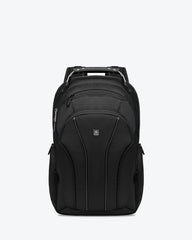
The LEVEL8 Atlas Laptop Backpack is designed for students whose daily load includes more electronics than paper. Its independent computer compartment uses 3D EVA padding to protect laptops from 13 to 16 inches, helping cushion the device when the backpack is placed beside a lecture-hall seat or bumped during a crowded commute.
Its 31 L capacity leaves room for books, headphones, a camera, or a change of clothes. Twenty-six organizer pockets give chargers, cables, drives, pens, and cards defined places, which is more useful for a computer-science or design student than one large pocket filled with loose accessories.
That structure adds weight. At 3.33 lb when empty, the Atlas is heavier than every other backpack in this guide. Its side pockets are also intended for bottles up to approximately 500 ml, so students carrying a large tumbler should check the fit first.
Best for: Engineering, computer-science, media, and design students carrying a large laptop and multiple tech accessories.

JanSport Big Student — Best High-Capacity Budget Pick
The JanSport Big Student offers 34 L of space in a relatively light 1 lb 7 oz body. Two large compartments allow students to separate textbooks and folders from lunch, gym clothes, or personal items instead of stacking everything in one deep space.
Its dedicated padded compartment fits laptops up to 15 inches, while the front organizer and two stash pockets keep smaller supplies accessible. A stretch bottle pocket can accommodate larger bottles more easily than a rigid side sleeve. The backpack also uses S-curve straps and a padded back panel, though its support system is simpler than those on the Recon or Nebula.
The main risk is overpacking. A 34 L backpack filled with dense textbooks can become uncomfortable regardless of its low empty weight.
Best for: Budget-conscious students who carry several books or spend full days away from their dorm or apartment.
Osprey Nebula 32 — Best for Long Campus Commutes
The Osprey Nebula 32 makes sense when getting to class involves more than crossing a quad. Its shoulder harness, breathable back panel, sternum strap, and compression straps help stabilize a laptop, books, water, and an extra layer during longer walks, bicycle trips, or public-transit connections.
A separate laptop compartment allows access to a computer without unpacking the main section. At 32 L, it provides enough space for a full class day and occasional weekend use. Dual bottle pockets also make it practical for students who carry water and coffee or want one side available for an umbrella.
Its commuter and outdoor features create more straps and compartments than a minimalist student may need. Laptop dimensions can also vary between versions, so measure a protected device before ordering.
Best for: Students living off campus or walking and cycling substantial distances between buildings.
Fjällräven Räven 28 — Best for Campus-to-City Style
The Fjällräven Räven 28 blends a structured everyday shape with enough capacity for classes. Its 28 L interior holds notebooks, a light jacket, lunch, and a 15-inch laptop without looking like an expedition bag when carried to an internship or café.
Multiple pockets separate stationery, cables, and personal items, while the G-1000 HeavyDuty fabric gives the bag a firm shape. Two side pockets provide quick access to a bottle and umbrella. At roughly 2.2 lb, it is neither exceptionally light nor excessively heavy for its size.
The laptop compartment is not the right match for every 16-inch computer, especially when the device has a bulky protective sleeve. Students regularly carrying a heavy stack of books may also prefer the more developed suspension of the Recon or Nebula.
Best for: Students who want a versatile backpack that moves naturally between classes, internships, and city activities.
Patagonia Refugio Daypack 26L — Best Lightweight Minimalist Pick
The Patagonia Refugio 26L suits a lighter academic load. Its straightforward main compartment can hold a laptop, a few notebooks, a thin jacket, and daily essentials without the weight and visual bulk of a heavily divided backpack.
A removable padded laptop sleeve gives the bag flexibility. Leave it installed for class, or remove it when using the Refugio for recreation. External stretch storage keeps frequently used items accessible, while the relatively low empty weight makes a noticeable difference for students who mainly use digital materials.
The simple layout provides fewer assigned spaces for chargers, pens, and small electronics. Students who dislike using accessory pouches may spend more time searching through the main compartment.
Best for: Tablet and laptop users who carry limited paper materials and prefer a lighter, less structured backpack.

What Size Backpack Is Best for College?
For most college students, a backpack between 20 and 30 L offers the most practical balance of capacity and portability. Students carrying thick textbooks, laboratory supplies, or gym clothes may need 30–35 L, while a digital-first student can often manage with less than 25 L.
Think about a real Tuesday rather than an unusually demanding day. A 15.6-inch laptop, charger, two folders, one textbook, lunch, and a 24-ounce bottle commonly point toward a 25–30 L bag. Add safety equipment, several large books, or sportswear, and a 30–35 L model becomes more reasonable.
Capacity does not reveal the entire storage picture. A backpack with thick padding and extensive organization may provide less open space than a simpler bag with the same liter rating. Browse laptop backpacks by computer compatibility and internal layout rather than relying on capacity alone.
How to Choose a College Backpack
Once you have a useful size range, evaluate how the backpack handles the items you carry every day. Computer protection, fit, and access generally matter more than decorative features.
Measure the Laptop, Not Just the Screen
A “16-inch laptop” label describes screen compatibility, not a universal device shape. Gaming laptops and mobile workstations may be thicker or wider than slim notebooks with the same diagonal screen measurement.
Measure the computer while it is inside the protective sleeve you plan to use. Compare those dimensions with the backpack’s laptop compartment, not its overall exterior. A suspended or padded compartment bottom provides additional protection when you put the bag on a concrete floor, though no sleeve can eliminate damage from every drop.
Students carrying expensive electronics may benefit from understanding why a dedicated laptop compartment matters before comparing decorative details.
Match Capacity to a Real Class Day
Place one normal day’s supplies on a table: computer, charger, folders, books, bottle, lunch, and anything required for labs or activities. This reveals whether you need open space, small pockets, or two separate main compartments.
Avoid buying an oversized backpack simply as insurance. Empty space encourages extra packing, and carrying items you rarely use adds strain over hundreds of campus walks. On the other hand, a bag that only closes when everything is arranged perfectly will become frustrating during rushed class changes.
Check Shoulder Straps and Back-Panel Fit
Wide, curved shoulder straps distribute pressure across more surface area. A sternum strap reduces side-to-side movement when walking quickly or cycling, while a ventilated back panel can reduce trapped heat. It will not prevent sweating completely.
Test the backpack with a realistic load. Tighten the straps until the bag sits close to the upper back, then walk, climb stairs, and sit down. Pressure around the neck or underarms after a few minutes is unlikely to improve during a full day.
Students who also want a bag for weekends can use this travel backpack guide to compare campus-focused features with clamshell openings, luggage sleeves, and multi-day capacity.
Choose Useful Organization Over More Pockets
Three features serve most students particularly well: an independent laptop compartment, a front pocket for small supplies, and an external bottle holder. Beyond that, more pockets are only helpful when they correspond to items you actually carry.
Tech-heavy students may appreciate dedicated spaces for drives, chargers, and adapters. Someone who mainly carries textbooks will gain more from a wide, unobstructed main compartment. Too many small sections can consume usable space and make it harder to remember where an item was stored.
Look Beyond “Waterproof” Claims
Most campus backpacks are water-resistant, not waterproof. Their fabrics may repel a brief shower, but water can still enter through zippers, seams, or an open bottle pocket.
Students walking in frequent rain should inspect zipper coverage and fabric treatment, then consider a separate rain cover for longer exposure. Keep electronics in the padded compartment and place papers in a document sleeve. No backpack should be assumed to protect a laptop during sustained rain unless it has verified waterproof construction.
Test the Fit Before You Commit
A good fit should remain comfortable when the backpack contains your actual supplies. If shopping in person, add weight similar to your typical load. If buying online, check exterior dimensions, computer-compartment measurements, empty weight, and the return policy.
Walk normally, bend to pick something up, and sit in a chair while wearing the bag. The straps should remain in position, and the bottom should not hang far below the waist. Once seated, the backpack should fit beside or beneath the chair without blocking a busy aisle.
Check access as well. You should be able to retrieve a student card, keys, or headphones without emptying the main compartment. A bottle pocket should hold its contents when you bend forward. These small actions reveal more about everyday suitability than an unusually long feature list.
Conclusion
The North Face Recon is the most balanced choice for the average college student. Choose the LEVEL8 Atlas when laptop protection and detailed tech organization justify a heavier bag, or the JanSport Big Student when capacity and price matter more than an advanced harness.
The Osprey Nebula 32 is better for longer commutes, while the Fjällräven Räven 28 offers a more city-oriented appearance. Students carrying mostly digital materials can reduce bulk with the Patagonia Refugio 26L.
The best college backpack is not automatically the largest model or the one with the most pockets. It is the bag that fits your protected laptop, carries an ordinary class-day load, and remains comfortable at the end of the walk.
Frequently Asked Questions
Is a 25L backpack big enough for college?
Yes, for many students. A 25 L backpack can usually carry a laptop, charger, notebooks, one or two books, lunch, and a small bottle. Students carrying laboratory gear or several textbooks may need 30 L or more.
Can a 16-inch laptop fit in a college backpack?
Only if the laptop compartment supports the device’s actual dimensions. Measure the computer with its case or sleeve because two 16-inch laptops can have different widths and thicknesses.
How heavy should a college backpack be when fully packed?
A commonly used guideline is to keep a backpack near or below 10% of the wearer’s body weight, but comfort and individual needs vary. Reduce unnecessary items and seek professional guidance if carrying the bag causes persistent pain.
Do college students need a separate laptop compartment?
It is not mandatory, but it improves protection and access. A separate padded compartment prevents books, bottles, and chargers from pressing directly against the computer.
Is one large compartment or several smaller compartments better?
One large compartment works well for books, binders, and bulky items. Multiple compartments are better for separating electronics and small accessories. Choose the layout that reflects what you carry most often.

Leave a comment